
If your WordPress site is image-heavy, you know how quickly a large media library can drag down performance, slow page loads, and reduce search visibility. That’s why WordPress Modern Thumbnails was built — a free plugin that natively transforms how WordPress handles image thumbnails without touching your original files.

What is Modern Thumbnails?
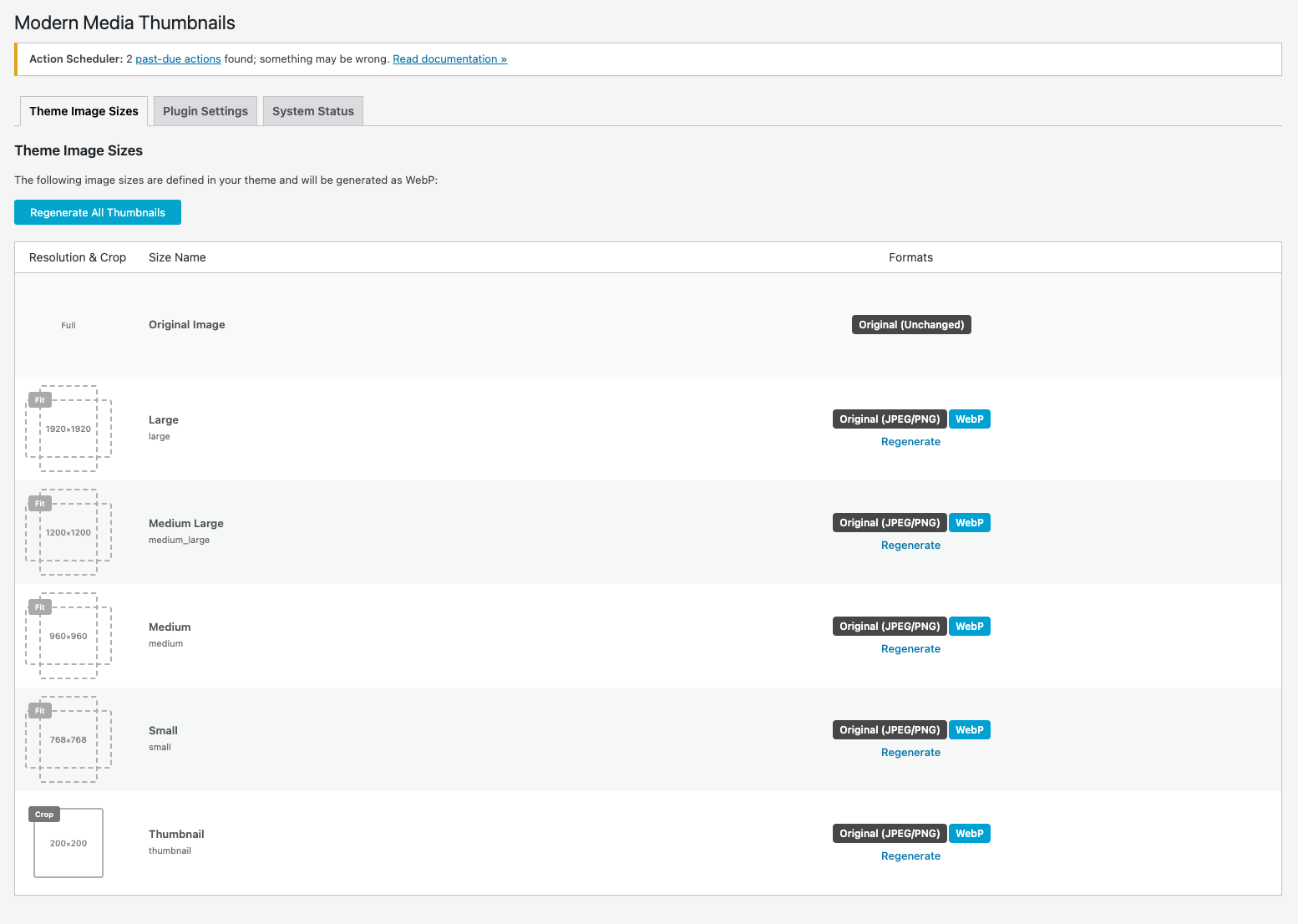
Modern Thumbnails is a WordPress plugin designed to improve thumbnail handling by generating modern, optimized formats like WebP and AVIF from your existing images — automatically and safely. It replaces legacy JPEG/PNG thumbnails with faster, smaller file sizes that help your site load quicker and score better in search rankings.
Requirements
This plugin requires the ImageMagick image processing library to generate modern thumbnails (WebP/AVIF) reliably and with high quality. It depends specifically on the PHP Imagick extension, which acts as a bridge between WordPress and the server’s ImageMagick installation. Most managed hosting environments already include Imagick, but if it’s missing, the plugin cannot process or convert images.
How to Install ImageMagick + Imagick (Quick Guide)
sudo apt update
sudo apt install imagemagick php-imagick
Then verify:
php -m | grep imagickFinally, don’t forget to restart your service
Apache
sudo systemctl restart apache2Nginx
sudo systemctl restart php8.5-fpmShared Hosting
- Check your hosting control panel (cPanel / Plesk → PHP Extensions)
- Enable imagick
- If unavailable, contact your hosting provider and request Imagick support
To confirm the compatibility, enable the plugin and go to the System Status tab on the Setting page.
Key benefits:
- Automatically creates optimized thumbnails in modern image formats instead of legacy JPEG/PNG assets.
- Honored WordPress’s native thumbnail system, but modernized it with efficient image formats
- Keeps your original images untouched — protecting quality and metadata.
- Works in the background without constant intervention — setup once and forget.
- Improves site speed, user experience, and SEO potential.
Why Thumbnails Matter for SEO & UX
Featured images and thumbnails play a key role in both user engagement and search engine optimization:
- Faster page speeds improve search rankings and reduce bounce rates.
- Thumbnails help your posts stand out in search results and social media shares.
- Smaller, optimized images consume less bandwidth — especially important for mobile visitors.
- Proper image optimization is a recognized SEO factor that supports better indexing.
Optimized thumbnails can significantly boost your WordPress SEO because:
- Search engines reward fast websites — and image size directly impacts load speed.
- Reduced image file size means faster Core Web Vitals and improved user satisfaction.
Bonus Tips to Maximize SEO With Images
Improve your image SEO even more by combining Modern Thumbnails with these best practices:
✔ Expand your alt text strategy – descriptive, keyword-rich alt tags help search engines understand image content.
✔ Optimize filenames – use descriptive words like modern-thumbnails-plugin.jpg instead of default names.
✔ Use lazy loading – load images only when they appear on screen for faster initial load times.
✔ Pair with other performance plugins – caching, CDN services, and image compression can further boost speed.
How Modern Thumbnails Works
- Integrates with WordPress’s native thumbnail system — no extra workflows or plugins needed.
- Generates WebP (and optionally AVIF) thumbnails for quicker loading times.
- Bulk processes existing thumbnails without changing your originals.
- Plays well with performance optimization tools like image compressors and caching plugins.
The Philosophy
1. Source Files Are Sacred
Your original images are precious. You invested time in photography, editing, color correction—sometimes years of work. Modern Thumbnails never modifies them, never moves them to a different folder.
Only the automatically-generated thumbnails are optimized. Your source files remain exactly as you uploaded them.
2. One Place, One Purpose
Instead of configuring four different plugins with overlapping settings, Modern Thumbnails puts everything in one place:
- Quality control for each format
- EXIF metadata management
- Server configuration
- Bulk operations
- System health checks
All in one navigation tree. No hunting through different plugin settings.
Why would you even generate legacy JPEG/PNG thumbnails if all modern browser long since support WebP? But even if you find a reason, rest asured that you have an option.
3. Modern Formats, Automatic Serving
The web moved to WebP years ago. AVIF is becoming standard. But WordPress still generates JPEG.
Modern Thumbnails automatically generates WebP for every thumbnail, reducing file sizes by 25-35% with zero quality loss. Your blog doesn’t just load faster—it loads *significantly* faster. Optionally you can enable an even faster AVIF (should your reader’s browser support it) or even set up a fllabck to legacy JPEG/PNG.
4. Copyright First
Watermarks and copyright metadata updates now become a part of native WordPress thumbnail generation. No multiple resamplings or messy source file backups. See #1: your source files are sacred
5. Forever Free
Let’s be honest, aren’t you seek of freemium software, subscriptions and in-app purchases?
I sure am, and that is why the Modern Thumbnails is a free wordpress plugin that enables both, modern WebP thumbnail formats and watermark/copyright capabilities.

Who This Is For?
Modern Thumbnails is perfect for:
- Photography bloggers with large image libraries
- Portfolio sites that showcase visual work
- E-commerce where product images matter
- Stock photo blogs serving images at scale
- Anyone who cares about performance
If your site has more than a few hundred images, Modern Thumbnails will make a measurable difference.
Get Started With Modern Thumbnails
Installing Modern Thumbnails is simple — upload it from your WordPress dashboard, activate it, and the plugin begins generating optimized thumbnails. It’s efficient, automatic, and safe for every site that uses images as a core part of content.
It is also an Open Source!
Download Modern Thumbnails (Free)
Modern Thumbnails is free, open-source, and ready to transform how your WordPress site handles images.
**7,000 photos taught me everything I needed to build this. Now it’s ready for your images.**